How Airlock Works
This page is a deep-dive for consultants and engineers who want a full mental model of Airlock before designing implementations or debugging edge cases. If you only want to use Airlock, the Getting Started page is the shorter path.
Where Airlock sits in the AEP Mobile SDK
The Adobe Experience Platform Mobile SDK is a small core (MobileCore) plus a set of registered extensions (Analytics, Identity, Lifecycle, UserProfile, …). Each extension subscribes to events on the SDK's internal event bus and can publish its own shared state.
Airlock registers as one of these extensions. It is not a wrapper around MobileCore.track… and it is not implemented in app code — it lives entirely inside the SDK runtime alongside Adobe's own extensions.
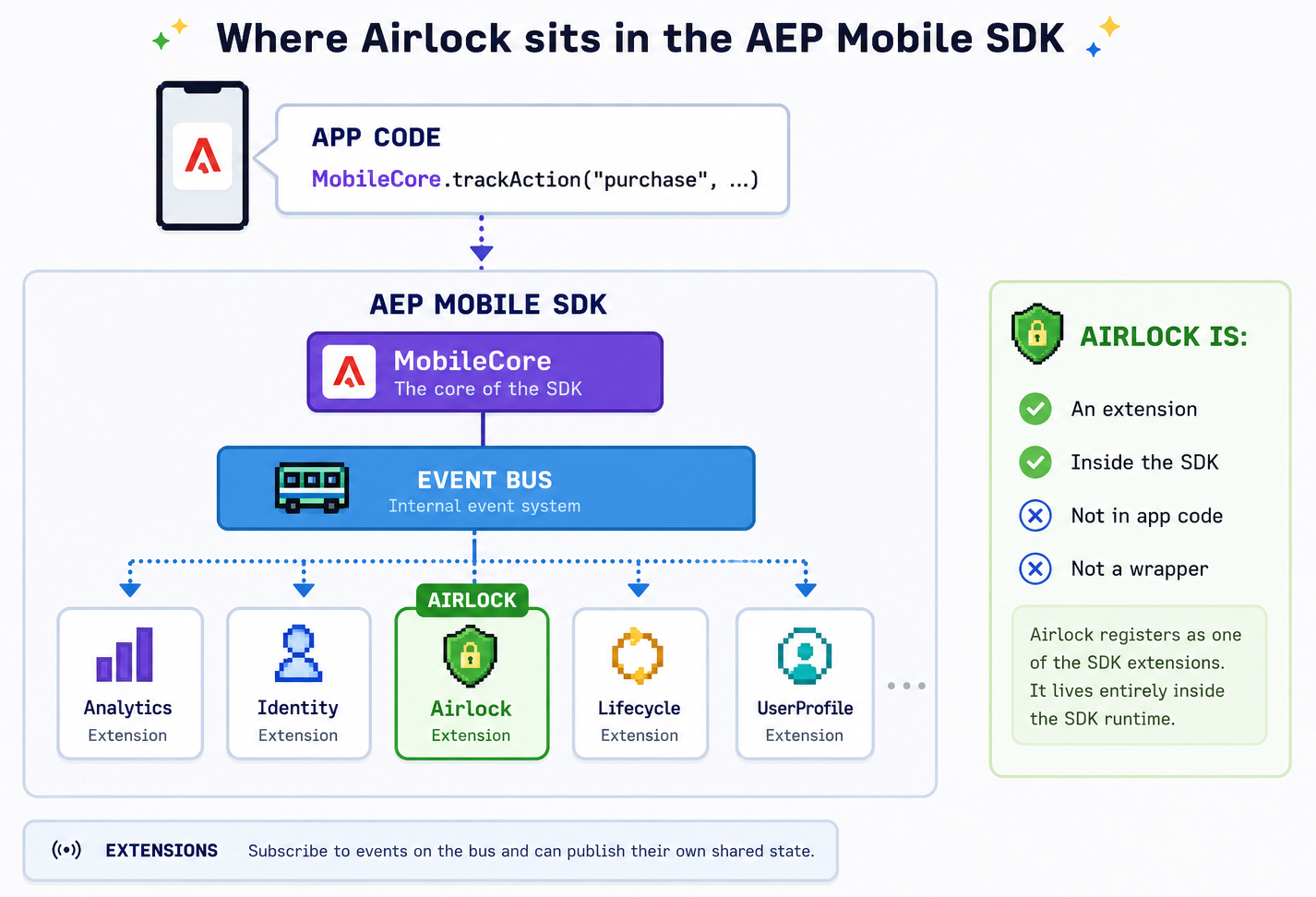
Two consequences fall out of this:
- Airlock does not block Analytics. Both extensions see the same event at the same time. If you want Analytics to wait for Airlock's enrichment, you have to gate Analytics with a Launch rule condition — Airlock cannot intercept on Analytics' behalf. That said, Airlock data elements (Custom Code, Lookup Table, Session Accumulator, Derived Metric) resolve at rule-evaluation time with access to live
sharedState, so an Analytics rule can reference them inside Attach Data / Modify Data actions and pick up Airlock-derived values without going through the two-rule pattern. This is the path for enrichment that needs to land on the original Analytics beacon rather than the dispatched one. - Airlock has access to shared state from every other extension. That's how macros can read
sharedState.identity.mid, whysharedState.lifecycle.appIdis available inside JS scripts, and so on.
What runs at initialisation vs. at event time
Adobe Launch (Tags) ships configuration to the device as a JSON blob (ADBMobileConfig.json or the equivalent loaded from Launch). The AEP SDK reads this and hands each extension its portion at initialisation.
| Phase | What Airlock does |
|---|---|
| Initialisation (once, at SDK boot or config reload) | Parses the Airlock Extension Configuration: macros, lookup tables, accumulator definitions, log level. Runs macro scripts once against the current shared state and publishes their return values into Airlock's own shared state. |
Event time (every trackAction/trackState) |
Receives the event from the bus, runs any Airlock action attached to a Launch rule that matched, dispatches the Airlock Processed Track event. |
This split is why some Airlock features have to live in the Extension Configuration rather than on individual rules:
- Macros must be defined globally because they're evaluated before any rule fires. They publish into shared state so rules can read them as ordinary data elements. You can't put a macro on a rule action because by the time the rule runs, it would be too late to pre-compute the value.
- Lookup tables and accumulators are stateful. Their state is owned by the extension, not by a rule, and is consulted by Airlock data elements that any rule can reference.
Per-event behaviour — enrichment, suppression, serialisation, product-string construction — lives on rule actions because it's specific to each event flow.
The two-rule pattern, in detail
(Recap of Getting Started, with the underlying mechanics filled in.)
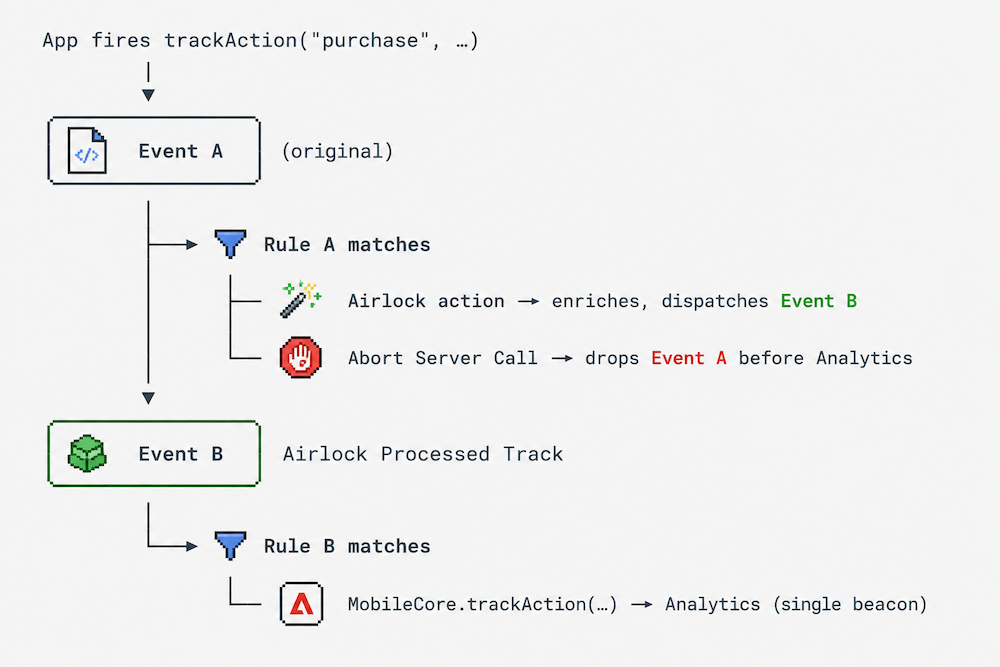
Airlock-processed events flow through Launch as two rule firings:
Rule A — fires on the original event (e.g. trackAction where action equals purchase). Its action is an Airlock action. When Rule A's action runs, Airlock:
- Receives the event payload.
- Runs whatever processing the action is configured to do (JS script, event serialisation, product string construction, …).
- Dispatches a new event of type
Airlock Processed Trackonto the SDK event bus, with the enriched payload.
Rule B — fires on the Airlock Processed Track event. Its actions are the ones you would normally have put on Rule A in a non-Airlock setup: Modify Data, Attach Data, Mobile Core → Track Action, etc. Because Rule B fires on the enriched event, it sees the data Airlock added.
This dispatch-and-rematch pattern is what gives Launch's rules engine a second pass at the enriched data. Without it, there is no mechanism in Launch to re-evaluate rules after an extension modifies an event.
Why the second beacon happens
Because Airlock dispatches a new event rather than mutating the original, the SDK event bus now has two events related to this user action:
- The original
trackActionevent — still visible toAnalytics,Identity, and every other extension. - The Airlock Processed Track event — picked up by Rule B, which (typically) calls
MobileCore.trackActionagain to forward the enriched payload to Analytics.
If you do nothing, Analytics receives both: one raw beacon from the original event, and one enriched beacon from Rule B's track call. That's the "double beacon" problem.
The fix is to suppress the original. There are two ways to do this, and they cover different cases:
| Approach | When to use |
|---|---|
| Abort Server Call action on Rule A | The cleaner pattern. Rule A's actions are: Airlock action + Abort Server Call. Airlock processes the event and dispatches the enriched one; the original is dropped before Analytics sees it. |
return null from a JS script |
When the suppression depends on a runtime decision inside the script itself (e.g. "only send if cart total > 0"). |
When the abort fires, the original event is consumed before Analytics processes it, and only the enriched beacon (sent by Rule B) reaches the server. See Abort Server Call for the action-level reference.
JavaScript Actions vs. native Launch rule conditions
Launch already has a rule engine: conditions, actions, data elements. Airlock adds a JavaScript rule engine inside one of Launch's actions. The two engines coexist, and choosing between them is a design decision.
| Use a native Launch rule condition when… | Use a JS Airlock script when… |
|---|---|
| The check is expressible as equality, contains, regex, exists. | The check requires computation: arithmetic, string parsing, comparing two fields. |
| You want the rule to be readable by non-developers in the Launch UI. | The logic is non-trivial enough that JS is clearer than chaining conditions. |
| The condition is reusable across multiple rules. | The logic is specific to one event flow. |
| You're filtering whether the rule fires at all. | You're enriching, restructuring, or conditionally suppressing inside an event the rule already matched. |
A common pattern is to use native conditions to gate the rule (so the action only runs on relevant events) and then use a JS script inside the Airlock action to do the per-event work. That keeps the cheap, declarative check in Launch and the expressive computation in JS.
Data Elements — what they are and when they resolve
A Launch Data Element is a named reference to a value extracted from somewhere. In a non-Airlock setup, a data element might be "the productId field on the current event" or "the value of the user_tier query parameter".
Airlock contributes four data element types. Each one resolves at the moment a Launch action or condition reads it, against the state Airlock holds at that moment:
| Data Element | Source | Resolved from |
|---|---|---|
| Custom Code | A JS snippet | Evaluated at read time. Has access to event, sharedState, helpers. |
| Lookup Table | Configured table in Extension Configuration | Looks up a configured key against the event's data. |
| Session Accumulator | Configured accumulator | Current counter/sum value, maintained by Airlock across events. |
| Derived Metric | A JS snippet (per-event) | Computed once per event and written into contextdata. |
The important distinction: macros run once at config load, data elements resolve every time they're read. If you have a value that needs to be fresh per event, it belongs in a data element (or a JS script). If it's stable for the session, a macro is cheaper.
Actions — what they are and how they sequence
A Launch Action is something the rule does when its conditions match. Built-in actions include "Modify Data", "Attach Data", "Mobile Core → Track Action". Airlock adds its own action types — each one is a way of processing the event payload before re-dispatching it.
Inside a Launch rule, actions run in order. This matters for Airlock because:
- An Airlock action mutates the in-flight event and then dispatches the enriched copy. Later actions in the same rule still operate on the original event, not the dispatched one.
- That's why Abort Server Call typically sits after the Airlock action in Rule A: the Airlock action fires off the enriched event first, then abort consumes the original.
- If you stack multiple Airlock actions on one rule (e.g. Set Serialized Events then Evaluate JavaScript Rules), each one operates on the cumulative state, and only the last dispatch reaches Rule B. This works, but it's easier to read as separate Airlock actions chained via the
airlockcontextdata key on Rule B's condition.
The action types at a glance
| Action | What it does |
|---|---|
| Evaluate JavaScript Rules | Run a JS script with access to event payload, shared state, lookup tables, accumulators, and macros. The script returns an enriched payload (or null to suppress). |
| Set Serialized Events | Attach deduplication IDs to specific Analytics events in &&events. No script required. |
| Product String Builder | Construct &&products from structured product data. No script required. |
| Reset Accumulators | Zero one or more accumulators. Used on app-lifecycle or domain-specific reset events. |
| Abort Server Call | Suppress the originating event. Required on Rule A to avoid the double beacon (see above). |
Putting it together
A working Airlock implementation typically looks like:
- Extension Configuration holds the durable, global pieces: macros for values derived from shared state, lookup tables for code-to-label translation, accumulator definitions for counters and sums.
- Rule A (one per app-fired event you want to enrich) matches the original event, runs an Airlock action, and aborts the server call.
- Rule B (typically one rule, shared across all Airlock-processed events) matches on
airlockcontextdata being present, modifies data as needed, and forwards to Analytics. - Data Elements are referenced wherever the value is needed — inside Airlock JS scripts (via the helpers), inside Rule B's Modify Data action, or as part of Rule B's conditions.
If your debugging starts from this model — one event in, one event dispatched, one beacon out — most edge cases (missing beacons, duplicated beacons, stale macro values) trace back to a single point in this flow.
See also
- Getting Started — the operational version of this page
- Extension Configuration — reference for macros, lookup tables, accumulators
- Abort Server Call — the action that prevents the double beacon
- Evaluate JavaScript Rules — the primary scripting action