Evaluate JavaScript Rules
The Evaluate JavaScript Rules action is Airlock's primary tool for enriching and transforming mobile analytics events. You write a JavaScript snippet in the Launch UI; Airlock runs it on-device against the event payload when the rule fires.
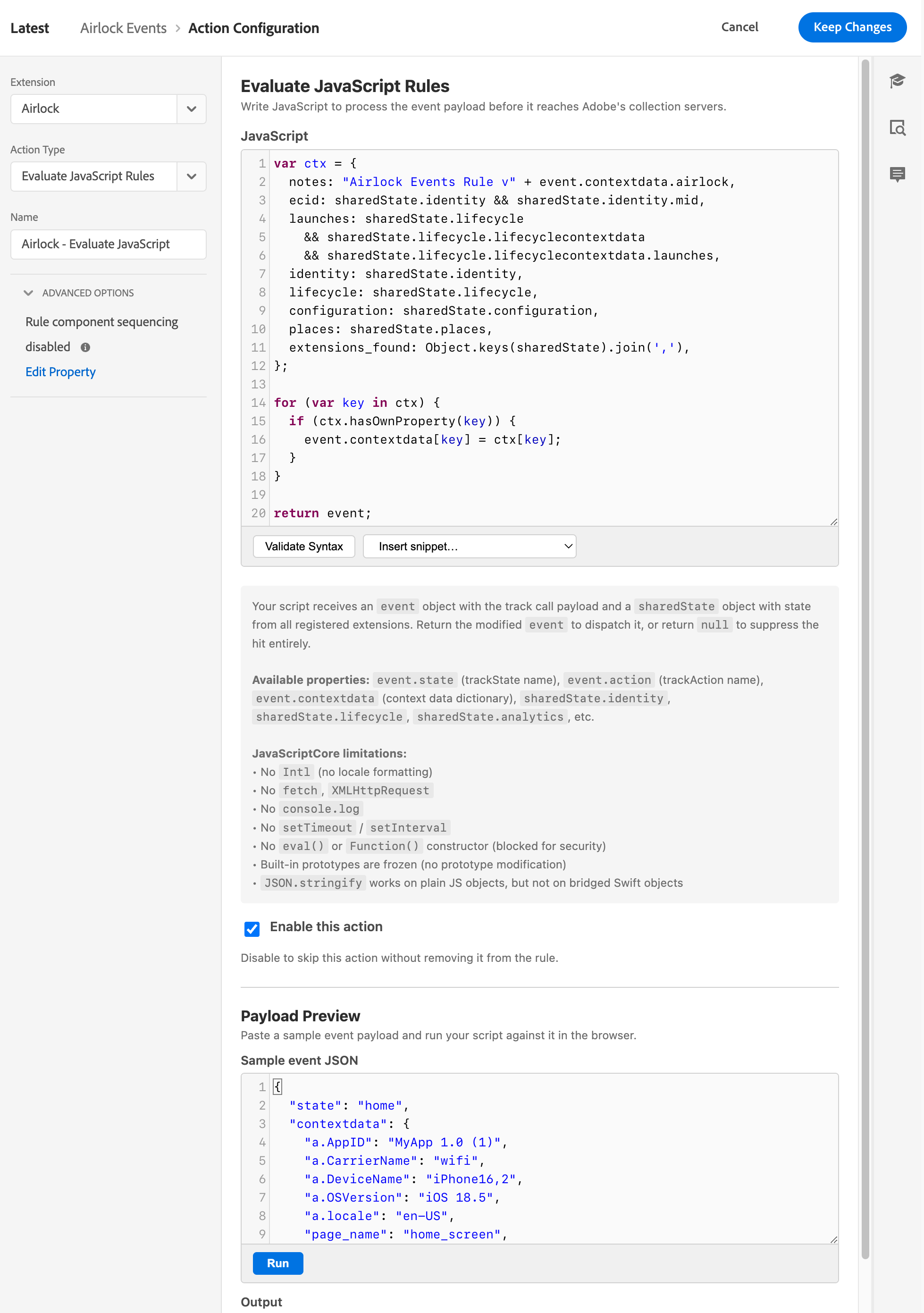
Example Evaluate JavaScript Rule Action
Description: The Evaluate JavaScript Rules action UI in Launch, showing the code editor and the Enabled toggle.
When to use this action
Use Evaluate JavaScript Rules when you need to:
- Enrich — add or modify contextdata keys based on the event payload or other extension values
- Suppress — drop a hit entirely based on runtime conditions
- Conditionally transform — apply different enrichment depending on event content
For simpler cases — attaching deduplication IDs to &&events, suppressing a hit unconditionally — the dedicated Set Serialized Events and Abort Server Call actions are easier to configure without writing code.
The script contract
Your script receives two arguments and must return a value.
Parameters
event — the AEP event data dictionary for the triggering track event. This is the full payload the app sent: action or state, contextdata, and any other keys. You can read from it and mutate it freely.
sharedState — a snapshot of all registered extensions' shared state at the time the rule fires, keyed by a lowercased, space-stripped version of each extension's friendly name. For example:
| Extension | Key in sharedState |
|---|---|
| Adobe Analytics | sharedState.adobeanalytics |
| Adobe Identity | sharedState.identity |
| Places | sharedState.places |
| Airlock | sharedState.airlock |
Airlock's own shared state includes macro results, lookup table outputs, and accumulator values published at event time.
Return value
| What you return | What happens |
|---|---|
| A plain object | Used as the enriched event payload; dispatched as an Airlock Processed Track event |
null or undefined |
The event is suppressed — no Analytics hit is sent |
Examples
Enrich: add a contextdata key
event.contextdata = event.contextdata || {};
event.contextdata['myapp.processed'] = 'true';
return event;
Suppress: drop events that don't match a condition
if (event.contextdata && event.contextdata['screen'] === 'debug') {
  return null; // suppress debug screen views
}
return event;
Conditional enrichment from shared state
var tier = sharedState.airlock && sharedState.airlock.userTier;
event.contextdata = event.contextdata || {};
event.contextdata['user.tier'] = tier || 'unknown';
return event;
Use serializeEvent() to attach a deduplication ID
// Serialised counter event: event1:ORD-99
serializeEvent('event1', event.contextdata['order_id']);

// Valued event with no dedup: purchase=49.99
serializeEvent('purchase', null, event.contextdata['purchase_amount']);

return event;
See Set Serialized Events for the full serializeEvent() reference.
Sandbox constraints
What you have access to
Inside your script you can read:
event— the full triggering event payload (action/state, contextdata, all keys).sharedState— shared state from every registered extension:sharedState.identity,sharedState.lifecycle,sharedState.places,sharedState.userprofile, and so on. This is how a script reaches an ECID, a launch count, or a current POI.sharedState.airlock— Airlock's own published state, including every Macro result, every Lookup Table output for this event, and every Accumulator value.serializeEvent()— the Set Serialized Events helper, callable directly from script.buildProductString()— the Product String Builder helper, callable directly from script.
What's not available
The following are unavailable:
setTimeout/setInterval/setImmediateevalandFunctionconstructor- DOM access
- Network access (
fetch,XMLHttpRequest, etc.) - Prototype mutation (
Object.defineProperty,Object.setPrototypeOf, etc.)
Scripts must be synchronous and complete within 2 seconds. A script that exceeds the timeout is terminated, the event is suppressed, and the JS context is reset for the next evaluation.
Error handling
Airlock is fail-open on script errors: if your script throws an exception, the original event (before any mutations) is passed through to Analytics unchanged, with two extra contextdata keys added:
| Key | Value |
|---|---|
airlock.status |
error |
airlock.error |
The JavaScript exception message |
This means a broken script never silently drops hits — it degrades gracefully. You can see the error message in Assurance or in the device logs (with log level set to debug or warning).
On a timeout (script took more than 2 seconds), the event is suppressed rather than passed through, and the JS context is reset.
The Enabled toggle
Each action has an Enabled checkbox. Unchecking it disables the action without deleting it — useful for pausing an action during testing without removing it from the rule.
Debugging tips
- Set log level to
debugin Extension Configuration while building rules. Airlock logs each evaluation result to the device console. - Check Assurance for the Airlock Processed Track event after each test fire.
airlock.statusandairlock.errorare your first signals. - Mutations must be returned. Changes to the
eventobject only take effect if youreturn event. Forgetting the return statement suppresses the hit. sharedStateis a snapshot. It reflects the state at the time the rule fires. If an upstream rule or the app modifies shared state after this rule fires, you won't see it.
See also
- Getting Started — the two-rule pattern and Assurance verification
- Set Serialized Events — the
serializeEvent()helper in more detail - Custom Code data element — a related pattern for returning scalar values from JS
- Extension Configuration — macros and shared state available via
sharedState.airlock - JavaScript Engines — JSC vs Rhino: language support, runaway protection, and cross-platform gotchas