Set Serialized Events
The Set Serialized Events action attaches deduplication IDs — and optional counter values — to Adobe Analytics events from a Launch rule. No app code changes required.
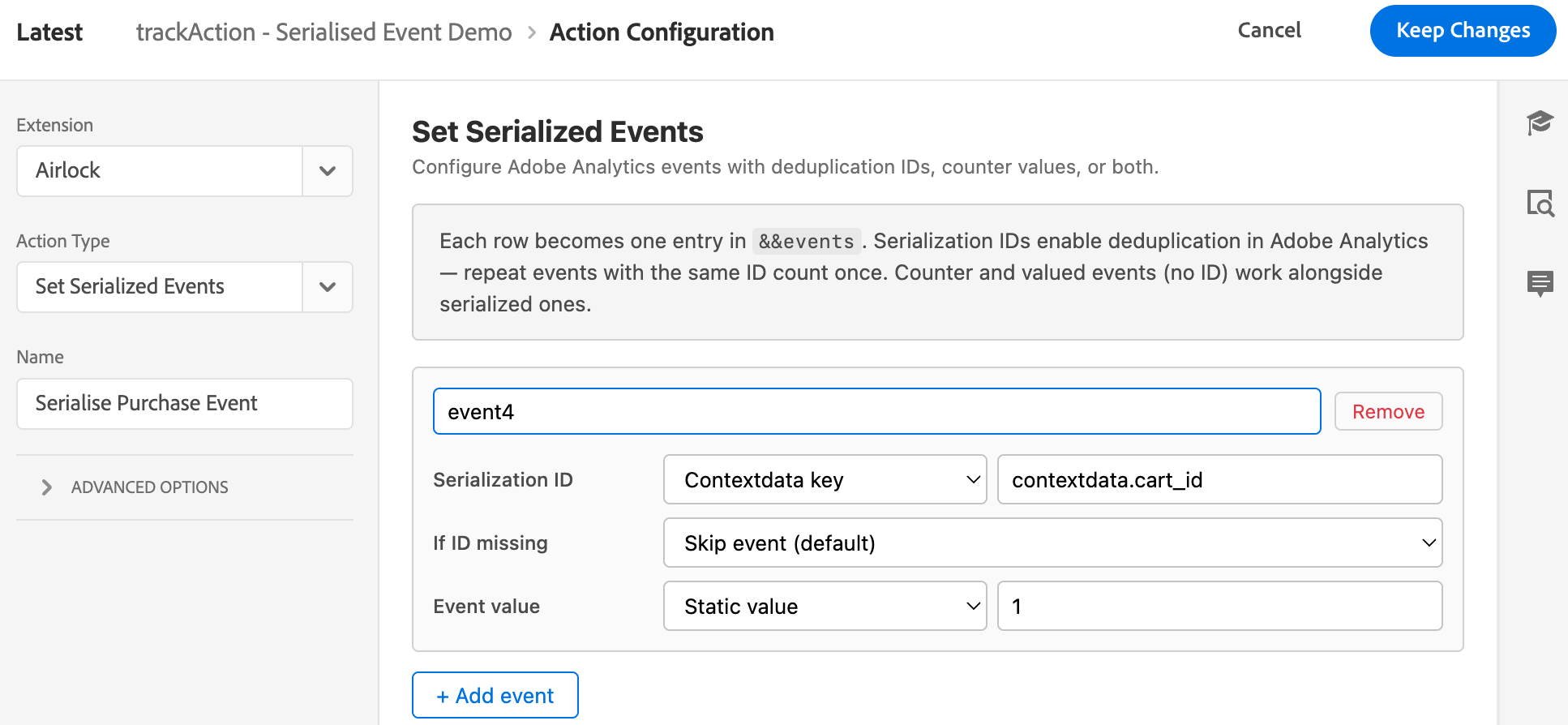
Serialized Event
Description: The Set Serialized Events action UI in Launch, showing a hypothetical Create Cart Event appended with the value of the contextdata.cart_id set by app developers
What is event serialisation?
Adobe Analytics uses the &&events contextdata key to populate s.events. Each entry in the comma-separated string can carry a deduplication ID — see Adobe's event serialization reference for the underlying mechanics:
| Wire format | Meaning |
|---|---|
event1 |
Plain counter event |
event1=49.99 |
Counter event with a numeric/currency value |
event1:ORD-99 |
Serialised counter — same ID = one count |
event1:ORD-99=49.99 |
Serialised and valued |
When two hits carry the same event name and the same serial ID, Analytics counts them as one occurrence — regardless of how many times the hit was sent. This is how purchase deduplication works: event1:ORD-99 fires twice (user backs out and retries) but counts once in reports.
On web, Launch has a built-in UI for this. On mobile, until Airlock, you needed app code to construct the &&events string by hand. This action gives you that control from a Launch rule.
Existing &&events values are preserved. If the app or an upstream rule already set &&events, Airlock merges new entries in — it doesn't overwrite. Existing entries that aren't touched by this action survive unchanged.
When to use this action
Use it when:
- You need deduplication for events that can fire more than once for the same logical occurrence: purchases, form submits, lead-gen completions
- You want to add counter or currency values to events from a rule rather than app code
- You want parity with web rules that already use serialisation
Don't use it when:
- A plain
s.eventsset via Modify Data is enough (no dedup needed) - The serial ID must come from state that no extension's shared state carries — Airlock can read shared state from Identity, UserProfile, Lifecycle, Places, and so on, so server-derived IDs surfaced through any of those extensions are fair game
Worked example: purchase deduplication
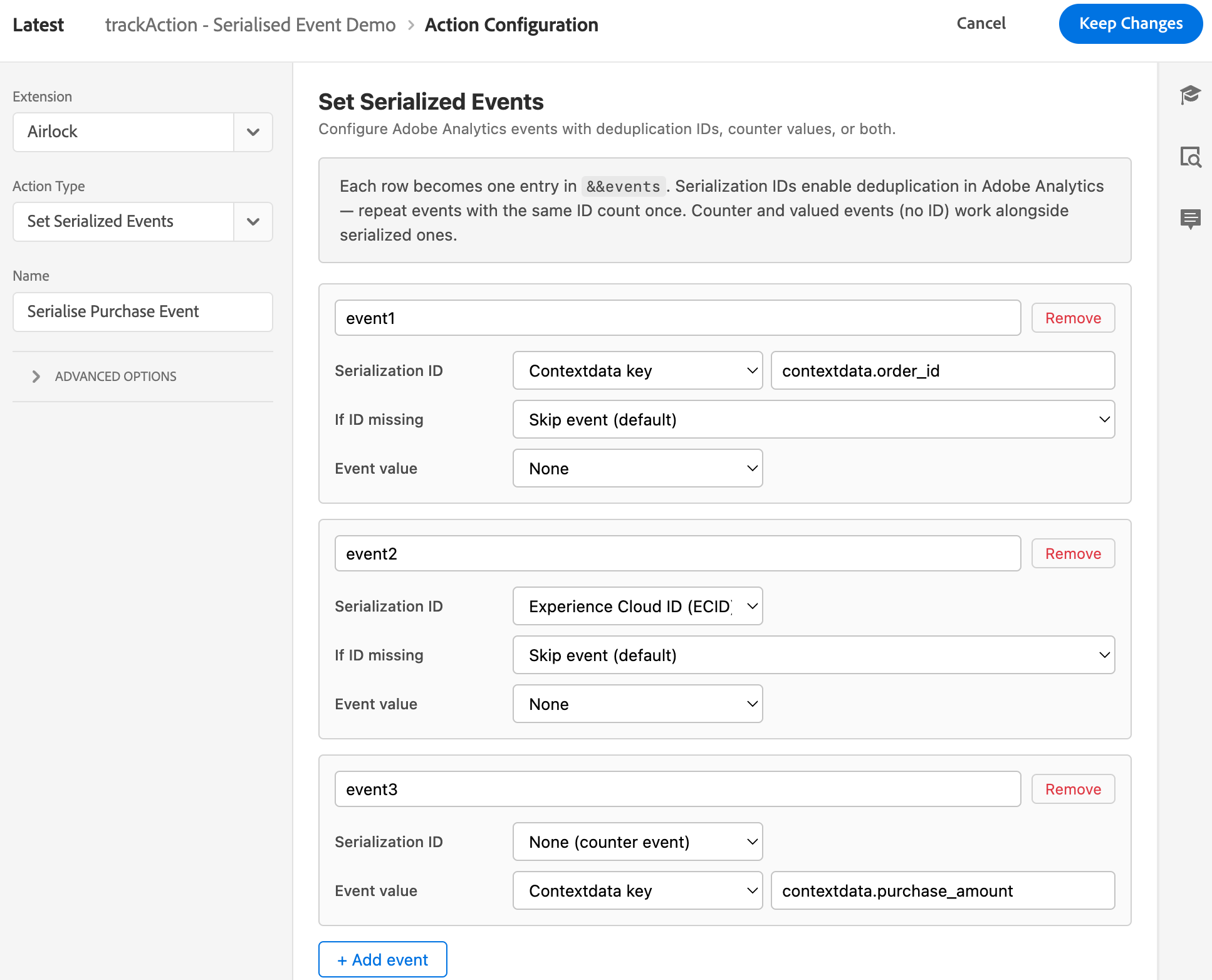
We'll wire up two common patterns for a retail implementation:
- Deduplicated purchase —
event1:ORD-{order_id}so a re-submitted purchase counts once - Per-visitor first-purchase —
event2:{ECID}so the same visitor submitting two purchases in a session counts once
The app sends:
Step 1 — Create the rule
In Launch, create a rule with:
- Event: Mobile Core → Track Action, action equals
purchase - Action: Airlock → Set Serialized Events
Step 2 — Add the deduplicated event1 row
Click + Add event and fill in:
| Field | Value |
|---|---|
| Event | event1 |
| Serialization ID source | Contextdata key |
| Path | contextdata.order_id |
| Event value | (leave blank) |
| If ID missing | Skip event (default) |
This produces event1:98765 when an order ID is present, and drops the row entirely when it's not.
Step 3 — Add the per-visitor event2 row
| Field | Value |
|---|---|
| Event | event2 |
| Serialization ID source | Experience Cloud ID (ECID) |
| If ID missing | Skip event |
Airlock reads the ECID from the Identity extension's shared state at runtime. Same visitor → same ID → Analytics dedupes to one count.
Step 4 — Add a currency value row (optional)
| Field | Value |
|---|---|
| Event | event3 |
| Serialization ID source | None (counter event) |
| Event value source | Contextdata key |
| Path | contextdata.purchase_amount |
This produces event3=49.99.
Step 5 — Save and publish
Publish the rule to your dev environment. The test app picks up the updated library after the next Launch config fetch.
Serialized Event Examples
{
  "action": "purchase",
  "state":  "",
  "contextdata": {
    "order_id": "12345",
    "purchase_amount": 5.99
  }
}
Serialization ID sources
| UI option | What it does |
|---|---|
| None (counter event) | No serial ID — the entry is an unserialised counter. Pair with an Event value for a currency event. |
| Contextdata key | Reads a dot-notation path from the event payload (e.g. contextdata.order_id) |
| Auto-generate unique ID | Generates a fresh 20-character alphanumeric ID per hit (timestamp + random suffix). Every fire counts as a distinct occurrence. |
| Experience Cloud ID | Reads mid from the Identity extension's shared state. Same visitor → same ID. |
| Static value | A hardcoded string. Useful for testing or fixed-identifier events. |
| Data element token | A Launch token like {%%order_id%%}. Launch pre-resolves the token before Airlock sees the action — it looks like a static value at runtime. |
Event value sources
An event value adds a numeric suffix (e.g. =49.99) — used for currency events and numeric counters.
| UI option | What it does |
|---|---|
| None | No value suffix |
| Contextdata key | Reads a dot-notation path from the event payload |
| Static value | A hardcoded numeric string |
| Data element token | A Launch token, pre-resolved by Launch before Airlock sees the action |
Missing-ID fallback
Shown only when a serialization ID source is configured. Controls what happens when the ID source resolves to empty or nil:
| Option | Behaviour |
|---|---|
| Skip event (default) | Drop the entire row — the event doesn't appear in &&events at all |
| Fire without serialization | Include the event as a plain counter (no :ID suffix) |
| Substitute a generated unique ID | Generate a fresh 20-char ID and use it as the serial ID |
Default to Skip unless you have a specific reason to fire without the ID. A missing counter event is easier to debug than an unexpected one.
Reserved characters
Serial IDs and values cannot contain ,, :, or = — these are the delimiters in the &&events wire format. Airlock strips them at format time: an ID like ORD,99 becomes ORD99 rather than forging a phantom event entry.
The serializeEvent() JS helper
If the rule already has an Evaluate JavaScript Rules action, you can achieve the same result from your script using the built-in serializeEvent() helper:
// Serialised counter
serializeEvent('event1', event.contextdata['order_id']);

// Serialised + valued
serializeEvent('event1', event.contextdata['order_id'], event.contextdata['purchase_amount']);

// Counter with a value, no serial ID
serializeEvent('purchase', null, event.contextdata['purchase_amount']);

// Plain counter (no ID, no value)
serializeEvent('event1');

return event;
The helper merges into any existing event.contextdata['&&events'] using the same action-wins semantics: if event1 already exists in the string, the helper's entry replaces it.
When to use which: Use the action UI for non-technical authors and for straightforward dedup cases. Use the JS helper when the rule already has a script and you want to keep everything in one place.
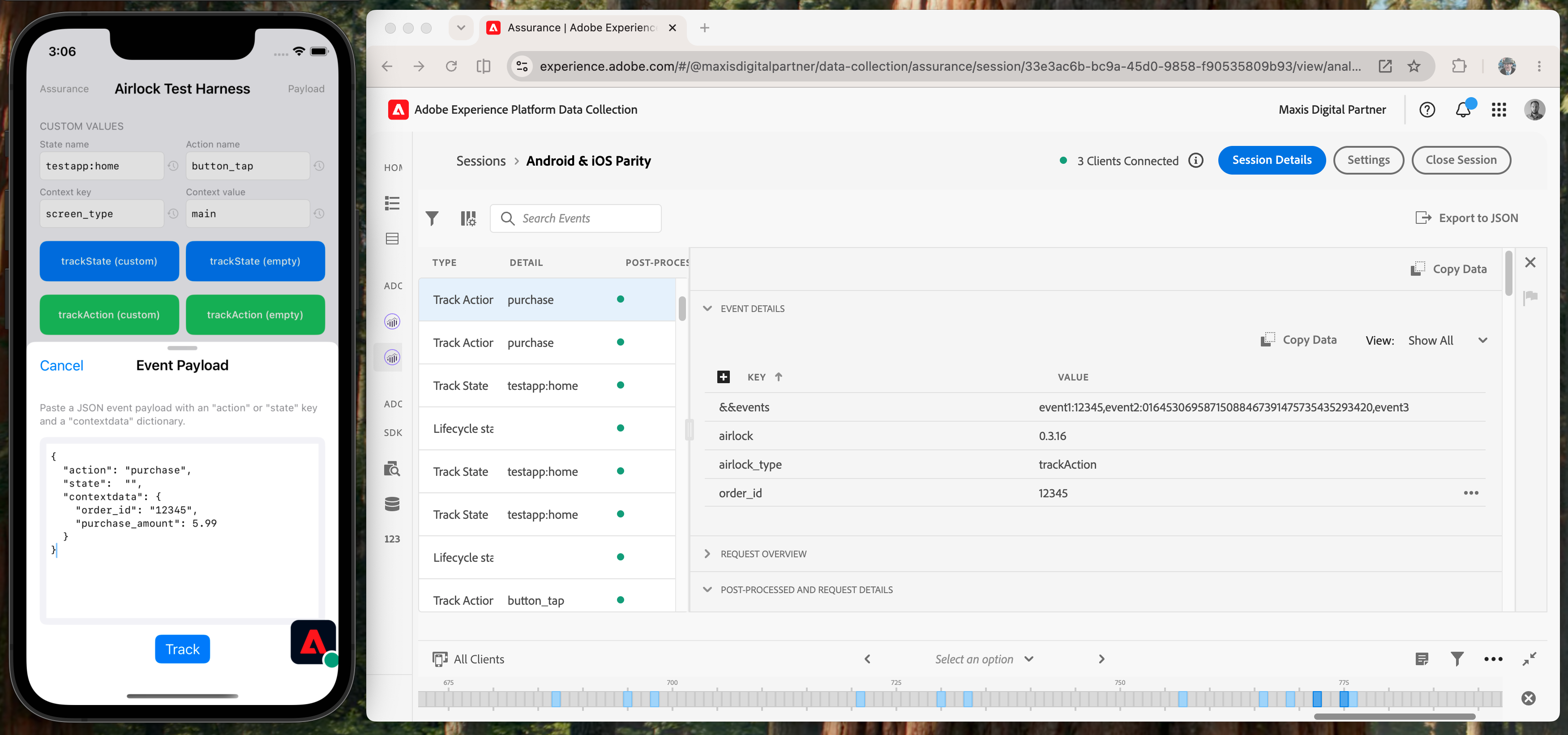
Verifying in Assurance
- Connect the test app to Assurance.
- Fire a
purchasetrackAction from the app with a context value. - In Assurance, find the Airlock Processed Track event. Confirm:
contextdata.&&eventsis present- It contains
event1:<order_id>if the order ID was set - It contains
event2:<ecid>if the Identity extension is initialised contextdata.airlock.statusisok
- Fire a second purchase with the same
order_id. In Analytics, confirm both hits dedupe to a single event count (Assurance shows the wire format, but only Analytics confirms dedup).
Airlock Processed Event
Description: Assurance showing the Airlock Processed Track event with contextdata.&&events expanded, displaying a serialised event string.
Common mistakes
&&events doesn't appear in the dispatched event.
All rows resolved to nil under the default Skip fallback. Check that your contextdata paths are correct, the ECID is initialised, and at least one row produces output. Open Assurance, look at the raw trackAction payload, and verify each ID source resolves to something.
The same : appears twice in a serial ID.
You typed event1:ID in the Event field instead of using the Serialization ID dropdown. Put just the event name (event1) in the Event field and let Airlock construct the :ID suffix.
Two purchases with the same order ID still produce two counts in Analytics.
Confirm s.events contains the :ORD-99 part, not just event1 — Workspace can show the raw events list. Also check the report suite's serialisation window (often 24 hours by default).
ECID source returns empty.
The Identity extension hasn't initialised yet. Confirm in Assurance that there's an Identity shared state event with mid populated before the trackAction fires.
See also
- Getting Started — the two-rule pattern and Assurance verification
- Evaluate JavaScript Rules — the
serializeEvent()JS helper in context - Session Accumulator data element — pairs well with serialised events for "first occurrence" patterns